College students have more information to manage than ever before. Between lectures, textbooks, assignments, presentations, research papers, exams, and part-time work, it can be difficult to keep everything organized. This is one reason AI study tools for college students have become increasingly popular.
Artificial intelligence can help students understand difficult concepts, summarize their own notes, create practice questions, organize research, improve writing, and plan study sessions. But the best use of AI is not to avoid learning. It is to make the learning process more efficient.
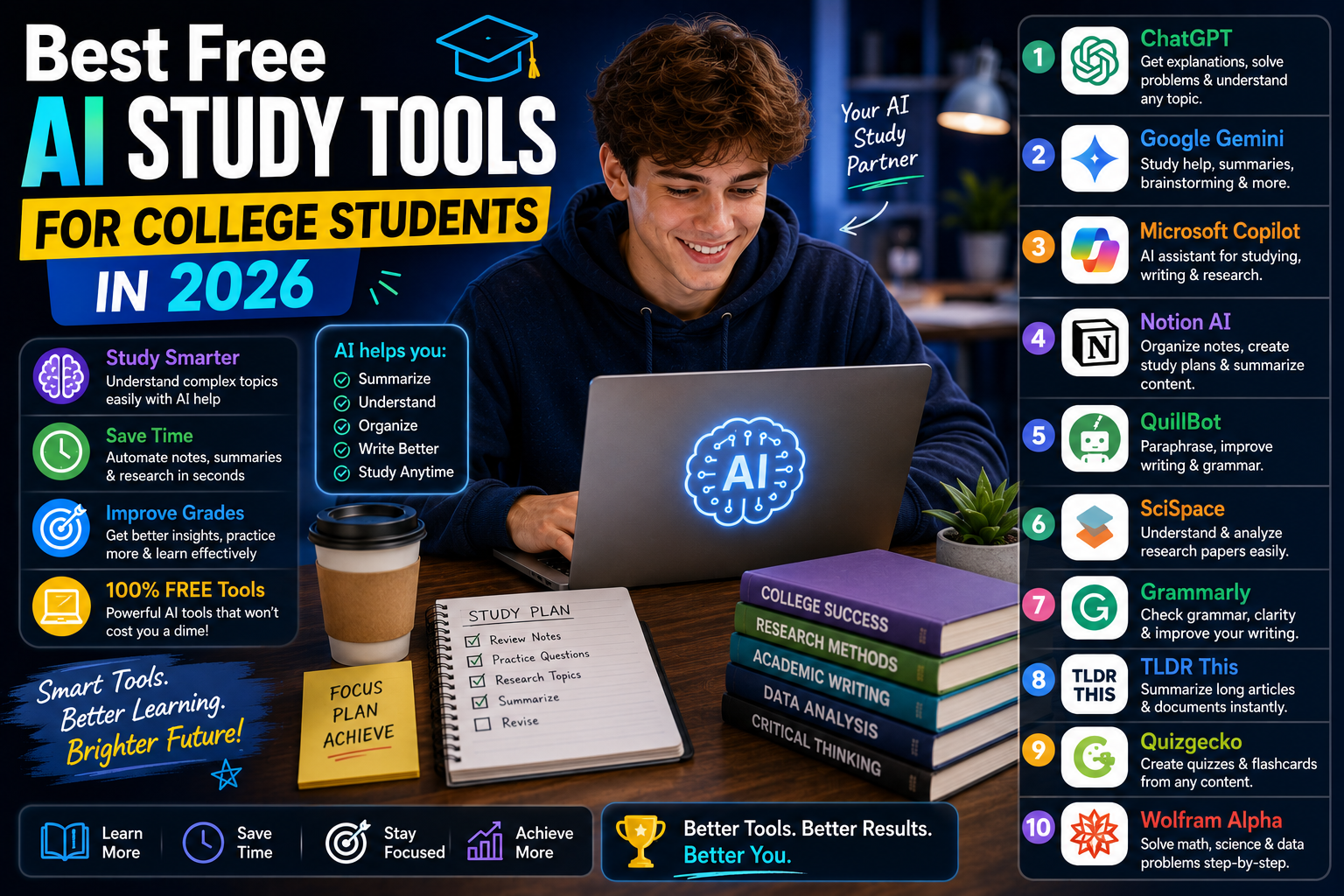
In 2026, students have access to many free and freemium AI tools. Some are designed specifically for studying, while others are general-purpose tools that can be adapted to academic work. This guide covers some of the best free AI study tools for college students in 2026, what each tool is best for, and how to use AI without becoming dependent on it.
Why College Students Are Using AI Study Tools
College courses can involve hundreds of pages of reading and large amounts of information. A student might need to understand a difficult textbook chapter in the morning, complete a programming assignment in the afternoon, and prepare a presentation in the evening.
AI can help reduce the time spent on repetitive tasks. For example, instead of spending an hour turning your lecture notes into revision questions, an AI tool may help you generate a first set of questions in minutes.
You can then spend your time actually answering them. AI can also explain a concept in different ways. If your textbook explanation does not make sense, you can ask an AI assistant for:
- A simpler explanation
- A real-world example
- An analogy
- A step-by-step breakdown
- Practice questions
- A short quiz
That flexibility makes AI useful for students with different learning styles.
ChatGPT – Best Overall AI Study Tool
ChatGPT is one of the most flexible AI study tools available to college students. You can use it for almost every stage of the learning process.
For example, you can ask it to explain a concept before a lecture, create practice questions after a lecture, and review your understanding before an exam.
Useful tasks include:
- Explaining difficult topics
- Creating study plans
- Generating quizzes
- Brainstorming essay ideas
- Reviewing your writing
- Explaining programming concepts
- Creating flashcards
- Practicing interview questions
The best approach is to ask ChatGPT to act as a tutor rather than an answer generator.
Instead of saying:
“Solve this problem.”
Try:
“Guide me through this problem step by step. Ask me questions and let me attempt each stage.”
This makes the learning experience much more interactive.
Google Gemini – Useful for Study and Productivity
Google Gemini is another strong general-purpose AI assistant. College students can use it for explanations, brainstorming, writing support, research planning, and study activities. Suppose you have a large topic for an upcoming exam.
You could ask:
“Break this topic into five study sections and create a one-week revision plan.”
Then you can work through each section individually. Gemini can also be useful for comparing explanations. If you do not understand a concept, ask it to explain the same idea in several different ways.
For example:
“Explain supply and demand using a simple real-life example.”
This can be particularly helpful when theoretical subjects feel difficult.
NotebookLM – Best for College Notes and PDFs
NotebookLM is one of the most useful options for students who work with large amounts of course material. College students often have PDFs, lecture slides, notes, research papers, and study guides. NotebookLM allows students to work with their own source material and ask questions about it.
For example:
“What are the three main arguments in these lecture notes?”
Or:
“Create 20 revision questions based only on these documents.”
This can be useful before exams because you can focus on the exact material relevant to your course. It is also useful for research projects where you have several documents that need to be understood together.
Why source-based AI matters
A general chatbot may answer based on broad information. A source-based tool can help you work specifically with the material you selected. That makes it easier to keep your study session connected to your actual course.
Perplexity – Best for Research and Source Discovery
College students frequently need to research topics outside their textbooks. Perplexity can help with the early stages of that process. It provides AI-generated answers while showing sources that can be investigated. For example, if your professor asks you to research the economic effects of artificial intelligence, you can use an AI search tool to identify major areas of discussion.
You can then open the sources and investigate them yourself. This is much better than copying an AI-generated paragraph into your assignment. Use Perplexity to discover information, then use the original sources to build your argument.
Grammarly – Best for Academic Writing
Many college students have strong ideas but struggle with academic writing. Grammarly can help identify issues involving grammar, spelling, punctuation, clarity, and writing style.
It can be useful for:
- Essays
- Research papers
- Reports
- Emails
- Scholarship applications
- Presentations
- CVs
The best workflow is simple. Write your own draft first. Then use Grammarly to identify problems. Do not automatically accept every suggestion. Read each change and decide whether it actually improves your sentence. This helps you develop your own writing ability.
Wolfram Alpha – Best for Math and Calculations
Students studying mathematics, engineering, economics, physics, statistics, or other quantitative subjects may benefit from computational tools. Wolfram Alpha can help with mathematical expressions, calculations, graphs, equations, and other computational tasks.
It can be useful for checking whether your answer is correct. For example, solve a calculus problem yourself first. Then use the tool to verify your result. If your answer is different, investigate why. This approach is much better than using the tool to avoid doing the problem yourself.
Quizlet – Best for Flashcards and Memorization
Some college courses require students to remember large amounts of information. This is particularly true in subjects such as biology, medicine, law, history, psychology, and languages. Quizlet can help turn information into flashcard-based study sessions. Instead of reading the same chapter repeatedly, you can test yourself.
For example:
Question: What is the function of mitochondria?
Answer: Mitochondria are organelles involved in producing energy for cells.
The question-answer format encourages active recall. You can also use AI-assisted features where available to create practice material from your notes. Availability of particular AI features can vary by plan and region, so students should check the current offering.
Notion – Best for Organizing College Life
Notion is useful when your biggest problem is organization. A college student may have five different subjects, multiple assignments, group projects, and several upcoming exams. Without a system, deadlines can easily be forgotten.
You can create a Notion workspace with:
- Course pages
- Assignment lists
- Exam schedules
- Study plans
- Reading lists
- Project notes
- Research material
AI features can also assist with organizing and working with written information, depending on your current plan. The important thing is to keep your system simple. A complicated productivity system can become another thing you need to maintain.
Otter.ai – Useful for Lecture Transcripts
Students sometimes struggle to take notes while listening to a fast lecture. AI transcription tools can help by converting recorded speech into text. Otter.ai is one example of a service built around transcription. If your institution and instructor allow recording, a transcript can be useful for reviewing parts of a lecture you missed.
Students should always check recording rules before using an audio transcription service. There can be privacy and consent considerations. Also remember that automatic transcription can contain errors. Important information should be checked against the original lecture material.
Canva – Best for College Presentations
College assignments are not always essays. Students frequently need to create presentations, posters, infographics, project graphics, and visual reports. Canva can help students create professional-looking visual material without requiring advanced graphic-design skills. AI-powered features can also help with idea generation and content creation, depending on the current plan.
A good presentation should not simply look attractive. It should communicate information clearly. Use AI to help with structure and ideas, but make sure your final presentation reflects your own research and understanding.
How to Build an AI Study Routine
Using ten tools does not make you a better student. In fact, constantly switching between applications can waste time. A better strategy is to create a simple routine.
Before Class
Use AI to preview the topic.
Ask:
“Explain the basic concepts I should understand before studying this chapter.”
This gives you some background knowledge.
During Class
Focus on the lecturer.
Take your own notes.
Write down:
- Main concepts
- Examples
- Questions
- Formulas
- Important definitions
Do not try to transcribe everything.
After Class
Clean up your notes.
Then use an AI tool to create:
- Summary points
- Practice questions
- Flashcards
- Difficult-concept explanations
Before the Exam
Test yourself.
Ask AI to create a mock exam based on your course material.
Then complete it without looking at your notes.
Review your mistakes.
This creates a complete learning cycle.
Best AI Study Tools by College Subject
Different courses require different tools.
Computer Science
ChatGPT, Gemini, and other coding assistants can help explain programming concepts and debug code.
Mathematics
Wolfram Alpha and specialized mathematics tools can help with calculations and explanations.
Research Subjects
Perplexity, NotebookLM, Semantic Scholar, and academic databases can help with research discovery.
Writing-Heavy Subjects
Grammarly, ChatGPT, and document-based AI tools can help improve clarity and organization.
Biology and Medicine
NotebookLM, flashcard tools, and AI tutors can help students review terminology and concepts.
Business and Economics
AI assistants can help explain models, brainstorm case studies, and create practice questions.
How to Use AI Without Cheating
This is one of the most important questions for college students. Universities have different rules regarding AI. Some allow AI for brainstorming and editing. Others may restrict its use for assignments or examinations. Always follow the policies provided by your institution and professor. A good general principle is:
Use AI to improve your learning, not to hide the fact that you did not do the work.
If an assignment requires your own analysis, write the analysis yourself, If AI is allowed for brainstorming, use it to generate possibilities. If AI is allowed for editing, use it to identify grammar problems.
The rules matter.
How to Get Better Results From AI Study Tools
Your prompts should contain context.
Instead of:
“Explain economics.”
Try:
“I am a first-year college student studying introductory economics. Explain inflation in simple terms, give me two real-world examples, and then ask me five questions to test my understanding.”
This prompt tells the AI:
- Who you are
- What you are studying
- Your level
- What you want explained
- How you want to practice
That usually produces a much more useful response.
Common Mistakes Students Make With AI
Using AI for Every Question
If you ask AI every time you become confused, you may never develop problem-solving skills. Try to solve the problem yourself first.
Copying Answers
Copied answers may contain mistakes and can violate academic rules.
Trusting AI Without Verification
AI systems can produce inaccurate information. Check important facts.
Using Too Many Tools
You do not need ten apps. Choose a small number and build a consistent workflow.
Ignoring Your Course Material
Your textbook, lecture notes, and professor’s instructions should remain central to your study process.
Are Free AI Study Tools Really Free?
Many AI tools offer free versions, but free does not always mean unlimited.
Some services may limit:
- Number of AI requests
- File uploads
- Storage
- Audio transcription
- Advanced features
- Model access
- Export options
These limits can change over time. Before building your entire semester around one tool, check its current plan and feature availability. For most students, however, a combination of a few free tools can provide plenty of support.
Conclusion
The best free AI study tools for college students in 2026 are the ones that solve specific academic problems. ChatGPT and Gemini are useful general-purpose study assistants. NotebookLM is excellent for working with your own course material, while Perplexity can help with research discovery. Grammarly supports writing, Wolfram Alpha helps with quantitative subjects, and Quizlet can make memorization more interactive.
Notion is useful for organization, Otter.ai can help with permitted lecture transcription, and Canva is valuable for visual assignments and presentations. But you do not need to use all of them. Start with the tool that solves your biggest problem. If you struggle with understanding concepts, use an AI tutor, If you struggle with research, use an AI research tool, If you struggle with organization, build a simple digital workspace.
If you struggle with memorization, use active-recall and flashcard tools.
The goal is not to let AI study for you. The goal is to use AI to make your own studying more effective.
FAQ’s
What is the best free AI study tool for college students?
ChatGPT is one of the most versatile options because it can help with explanations, revision, writing, research, and practice.
Which AI tool is best for studying PDFs?
NotebookLM is a strong option for working with your own documents and course material.
Can AI create a college study plan?
Yes. AI can create a study schedule based on your subjects, available time, deadlines, and exam dates.
Is AI allowed in college?
It depends on your university and professor. Always check your institution’s academic-integrity and AI-use policies.
Are free AI study tools enough?
For many students, free versions provide enough features for basic studying, research, writing, organization, and revision.