Research has changed dramatically in the last few years. Students no longer have to spend hours searching through dozens of websites just to find basic information about a topic. With the right AI tools, you can discover useful sources, understand difficult research papers, organize information, and create a better research workflow.
There is an important difference between using AI for research and simply asking an AI chatbot to give you an answer. Good research requires reliable sources, fact-checking, critical thinking, and proper citations. AI can make these tasks faster, but it should not replace the research process itself.
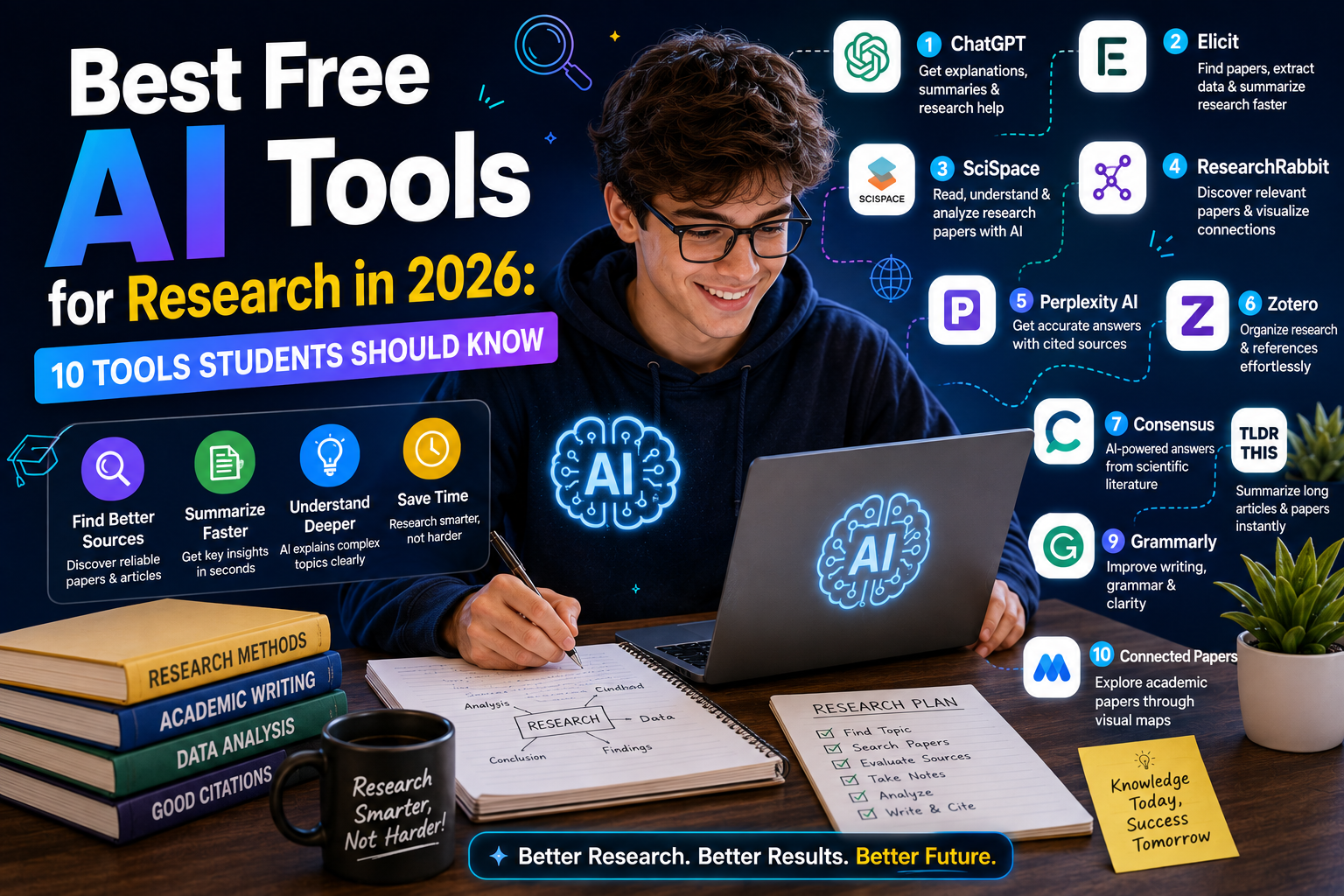
In 2026, students have access to many AI-powered research tools, including general AI assistants, academic search engines, research-paper tools, and platforms designed to work with your own documents. This guide covers 10 of the best free AI research tools for students in 2026, what each tool does, and how you can use them without compromising the quality of your research.
What Are AI Research Tools?
AI research tools are applications that use artificial intelligence to help users find, understand, summarize, organize, or analyze information.
Depending on the tool, you may be able to use AI for:
- Finding research papers
- Discovering sources
- Summarizing articles
- Understanding academic concepts
- Exploring related studies
- Analyzing documents
- Finding citations
- Creating research questions
- Organizing notes
- Comparing information
Some tools are designed specifically for academic research, while others are general AI assistants that can still be useful for research-related tasks.
The important thing is to choose a tool based on your actual research problem.
Perplexity – Best for AI-Powered Web Research
Perplexity is one of the most useful AI research tools for students who want to search the web while receiving summarized answers with sources. Instead of giving you a long list of search results, Perplexity attempts to provide a direct answer and shows supporting sources that you can investigate further. This can save time during the early stages of research.
For example, if you are researching renewable energy, you could ask:
“What are the main challenges facing solar energy adoption in developing countries?”
You can then examine the sources behind the response and use those sources as starting points for deeper research.
Best uses for Perplexity
- Initial research
- Finding sources
- Exploring unfamiliar topics
- Comparing viewpoints
- Discovering recent information
- Generating research questions
However, do not copy AI-generated answers directly into an academic paper. Open the original sources and verify the information first.
Google Gemini – Useful for Research and Brainstorming
Google Gemini can be useful at several stages of the research process. You can use it to brainstorm research topics, explain difficult concepts, organize ideas, and create questions that you can investigate further.
For example, if your assignment is about artificial intelligence in education, you could ask Gemini to suggest several research directions. It might help you narrow a broad subject into topics such as:
- AI and student productivity
- AI-assisted personalized learning
- AI and academic integrity
- AI in online education
- AI’s impact on teaching methods
The important part is that the AI should help you develop your research direction, not become your final source.
Google NotebookLM – Best for Researching Your Own Sources
NotebookLM is particularly useful when you already have research material.
Suppose you have collected:
- Research papers
- PDF reports
- Lecture notes
- Government documents
- Articles
- Books or other supported material
Instead of repeatedly reading through every document to find information, you can use NotebookLM to work with your sources and ask questions about them. This makes it especially useful for literature reviews and research projects where you have a large collection of documents.
You can ask questions such as:
“What are the main arguments presented across these documents?”
Or:
“What differences exist between the conclusions of these sources?”
The important advantage is that your research workflow remains centered around the documents you selected.
Consensus – Useful for Research Questions
Consensus is an AI-powered academic search tool designed to help users find evidence from scientific research. This can be useful when you have a question that requires academic evidence rather than general internet information.
For example:
“Does regular exercise improve memory?”
A general search may return blog posts, advertisements, social media discussions, and research papers. An academic research tool can help you focus more specifically on scientific literature. Students should still read the original studies rather than relying entirely on an AI-generated summary. This is especially important when the research question is complicated or when studies disagree.
Elicit – Useful for Literature Reviews
Elicit is designed to help researchers work with academic papers. One of the biggest challenges in academic research is reviewing many papers and identifying which ones are relevant. A tool such as Elicit can help speed up parts of that process.
For example, if you are researching the relationship between social media and student mental performance, you may need to identify dozens of potentially relevant studies. Instead of reading every paper from beginning to end immediately, you can use research tools to organize your initial exploration. This does not eliminate the need to read the papers. It simply helps you decide which papers deserve closer attention.
Semantic Scholar – Best for Discovering Academic Papers
Semantic Scholar is an academic search platform that can help students discover scientific and scholarly literature. It is particularly useful when you already know your research topic and want to explore relevant papers. You can search for a topic and then investigate papers, authors, citations, and related research.
This is useful for university students writing:
- Research papers
- Literature reviews
- Thesis projects
- Dissertations
- Technical reports
One useful research habit is to start with one strong paper and then explore the papers it references. This can lead you toward the broader academic conversation surrounding your topic.
Research Rabbit – Useful for Exploring Related Papers
Finding one academic paper is easy. Finding the right group of related papers can be much harder. Research Rabbit is designed to help researchers explore connections between academic papers. You can start with a paper that is already relevant to your topic and then discover related research.
This can be useful when your research topic has a large academic literature. For example, suppose you find an important paper about machine learning in healthcare. You can use a research discovery platform to explore related papers, authors, and research areas. This can help you build a stronger literature review instead of relying on a handful of random Google results.
ChatGPT – Best for Understanding Difficult Research
General AI assistants can be surprisingly useful when you already have good sources but do not fully understand them. For example, you might find a research paper containing technical terminology that you have never encountered before. Instead of immediately searching for every term separately, you can ask an AI assistant to explain a paragraph in simpler language.
You can also ask:
“Explain the methodology used in this study in simple terms.”
Or:
“What is the main argument of this paper?”
Or:
“What assumptions does this research make?”
This can make complicated research easier to understand.
You should never assume that an AI explanation is automatically an accurate interpretation of the paper. When something is important, return to the original text.
Scite – Useful for Checking Research Citations
One of the difficult parts of academic research is understanding how a paper has been used by other researchers. A citation does not automatically mean that another researcher agrees with the original paper. Sometimes a paper is cited because another researcher is criticizing its findings.
Scite is designed around citation analysis and can help researchers understand how publications are cited. This can be particularly useful when evaluating whether a particular academic claim has strong support or whether there is disagreement in the literature. For serious research projects, this type of context can be much more valuable than simply counting how many times a paper has been cited.
Grammarly – Useful for Research Writing
Research is not finished when you find the information. You still need to communicate your findings clearly. Grammarly can help students identify grammar, spelling, punctuation, clarity, and style problems in their writing.
This can be particularly useful when writing long research papers. Editing software should not change the meaning of your research. Always review suggested changes yourself. Your final paper should accurately represent what the original sources actually say.
How to Use AI for Academic Research
The best AI research workflow is usually a combination of AI tools and traditional research methods.
A simple workflow looks like this:
Step 1: Define Your Research Question
Start with a specific question.
Instead of:
“Artificial intelligence in education”
Try:
“How does generative AI affect university students’ study habits?”
A specific question gives you a much better starting point.
Step 2: Discover Sources
Use academic search engines and AI research tools to discover potentially useful papers and reports. Do not immediately assume the first results are the best sources. Create a small collection of potentially relevant material.
Step 3: Read the Sources
AI can help summarize papers, but you should still read the important sections yourself.
Pay particular attention to:
- Methodology
- Sample size
- Results
- Limitations
- Conclusions
Step 4: Compare Sources
Do not rely on one paper.
Ask:
- Do different studies reach the same conclusion?
2. Are there disagreements?
3. Are the studies using different methods?
4. Are some studies older than others?
This is where real research begins.
Step 5: Organize Your Notes
Create notes that distinguish between:
Fact: What the source actually says.
Interpretation: What you think the information means.
Question: What you still need to investigate.
This simple system can prevent confusion later.
Step 6: Write in Your Own Words
Do not simply copy AI-generated summaries.
Read the source, understand the argument, and write your own explanation.
Then cite the original source appropriately.
Can AI Write a Research Paper?
Technically, AI tools can generate a research paper.
But that does not mean students should submit AI-generated work as their own.
Academic institutions may have specific policies regarding AI use, and those policies can vary.
The safest approach is to use AI as a research assistant rather than as a replacement author.
You can use AI to:
- Brainstorm topics
- Explain concepts
- Find research directions
- Organize notes
- Create questions
- Improve clarity
- Identify gaps in your argument
But your research, analysis, judgment, and final writing should remain under your control.
How to Check Whether an AI Research Answer Is Reliable
Never assume that an AI answer is correct simply because it sounds professional.
Use this checklist:
Check the source
Is there an original source?
Open the source
Do not rely only on the citation title.
Check the date
Is the information still current?
Compare multiple sources
Do independent sources support the same claim?
Check the original wording
Does the source actually say what the AI claims?
This is particularly important when researching statistics, scientific findings, laws, technology developments, or current events.
AI Research Tools vs Google Search
Traditional Google search is still extremely useful. AI research tools should not be considered a complete replacement. Google can help you discover a huge range of information, while AI tools can help you process and understand that information. A strong workflow can use both.
For example:
Google Search → Discover sources → Academic database → Find research papers → AI tool → Understand papers → Original sources → Write research
This is generally better than:
AI chatbot → Copy answer → Submit assignment
Are Free AI Research Tools Enough for University Students?
For many student projects, free tools can provide a very useful starting point. You can discover sources, summarize documents, brainstorm ideas, and organize research without paying for multiple premium subscriptions. Advanced features may require paid plans.
More importantly, the quality of your research depends more on your sources and methodology than the number of AI tools you use. You do not need ten subscriptions.
A student may be able to complete most research tasks with:
- One AI assistant
- One academic search engine
- One note-taking tool
- A reliable citation manager
- Access to university library resources
The goal should be a simple and reliable research workflow.
Common Mistakes Students Make With AI Research
Mistake 1: Trusting AI Without Checking Sources
AI can make factual errors.
Always verify important information.
Mistake 2: Using Only One Source
One article or research paper is rarely enough for a serious academic project.
Mistake 3: Copying AI Text
Generated text may not accurately represent the original source.
Understand the source and write your own analysis.
Mistake 4: Ignoring Publication Dates
Research changes.
An old article may no longer represent the current state of a field.
Mistake 5: Using AI Instead of Thinking
AI can generate possibilities, but you still need to decide whether those possibilities make sense.
FAQ’s
What is the best free AI research tool for students?
Perplexity is useful for web research, while NotebookLM is excellent for working with your own research documents.
Can AI find academic research papers?
Yes. Tools such as Semantic Scholar, Consensus, Elicit, and Research Rabbit can help students discover academic literature.
Can I use ChatGPT for academic research?
Yes. It can help explain concepts, brainstorm research questions, organize ideas, and review your work, but important information should be verified.
Should I trust AI-generated research citations?
No. Always open the original source and confirm that the citation actually supports the claim.
Are free AI research tools enough for students?
For many projects, free tools are enough for research discovery, organization, and basic analysis, although advanced features may require paid access.
Conclusion
The best free AI tools for research in 2026 are the ones that make the research process faster without removing the researcher’s responsibility. Perplexity can help with initial web research. NotebookLM is useful when you want to work with your own documents. Consensus and Elicit can help explore academic literature, while Semantic Scholar and Research Rabbit are useful for discovering scholarly papers and related research.
General AI assistants such as Gemini and ChatGPT can help you understand complicated ideas, while tools such as Scite can provide useful citation context. But no AI tool can replace careful research. The strongest workflow is simple: define a good question, find reliable sources, read them carefully, compare evidence, organize your notes, and write your own conclusions. Use AI to save time and improve understanding — not to skip the work that makes research valuable.